Automatic loan interest in a budget app, explained
Updated October 15, 2026
If you track a mortgage, car loan, or student loan in a budget app without bank sync, the loan balance quietly goes wrong. You record each payment, the balance drops by the full payment, and the interest the bank charged is never added back. After a year, your net worth looks better than it is. FireBudget’s automatic loan interest fixes that with a simple, visible monthly estimate. This guide explains how the calculation works, how it interacts with your budget, and how to correct it when the bank’s number differs.
The problem in one example
Say you owe 200,000 on a mortgage at 5% and pay 1,200 a month. Roughly 830 of that first payment is interest and about 370 reduces what you owe. If your budget only records the payment, it shows the balance falling by 1,200 instead of about 370. The error grows every month.
Bank-synced apps get the real balance from the lender. A manual budget needs another way to account for interest.
How FireBudget estimates interest
Each month, FireBudget adds one interest transaction to the loan account using this formula:
interest = opening balance × annual rate × days in the month ÷ 365- Opening balance is what you owed just before the first day of the month.
- Annual rate is the rate you entered for that period.
- Days are calendar days, so a 31-day month accrues slightly more than a 30-day month.
With the example above, a 30-day month at 5% on 200,000 gives 200,000 × 0.05 × 30 ÷ 365 = 821.92. A 31-day month gives 849.32.
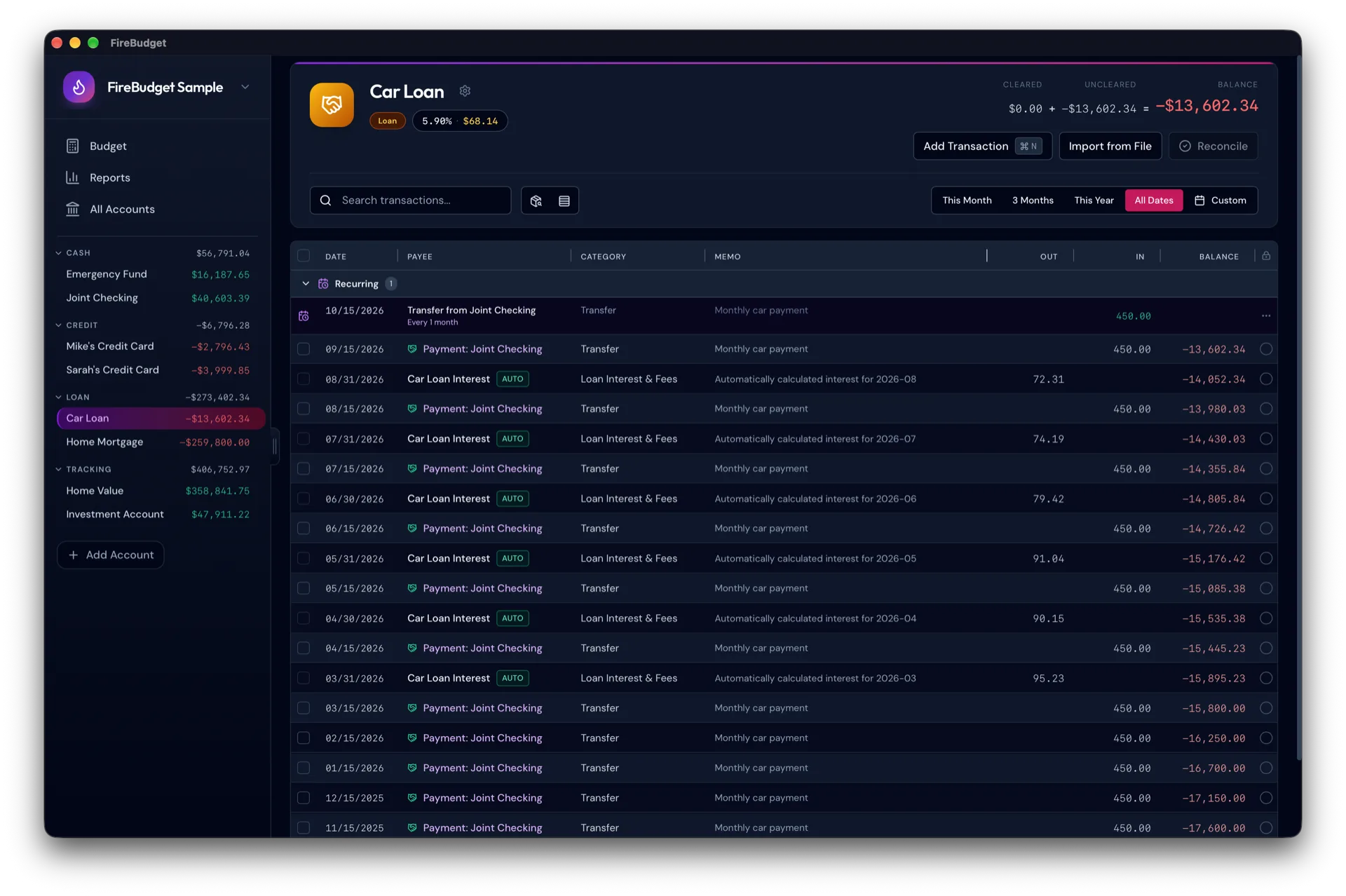
The interest row is dated on the last day of the month and marked Auto. You can open it to see the opening balance, the rate periods, and the calculated amount. Generated rows are read-only, so the history always matches the formula.
Rate changes
Rates are effective-dated. When your rate changes, you add a new rate with the date it starts, and earlier months keep their old rate. A change in the middle of a month splits that month by calendar days: for example, 10 days at the old rate and 21 days at the new one, both on the same opening balance. Before you save a change that affects past months, FireBudget previews the impact.
What the estimate does not model
This is an estimate, not a copy of your lender’s system. It does not model:
- interest that accrues daily on a changing balance within the month,
- how each payment is split between principal and interest,
- amortization schedules, fees, or flat-rate hire purchase loans,
- offset, redraw, or other flexible loan features,
- bank-specific rounding.
One consequence to know: a payment made during a month reduces the next month’s opening balance, not the current month’s. If your lender calculates on the daily balance, FireBudget’s figure will differ a little. The next section covers how to correct that.
Matching a statement
When a loan statement arrives, open the loan account’s interest settings and choose Match statement. Enter the statement’s month-end date and the amount owed, as a positive number the way the bank shows it. FireBudget compares it with its own balance on that date and adds the difference as an ordinary, editable transaction categorized as Loan Interest & Fees. If the balances already agree, it adds nothing.
Future interest is then calculated from the corrected balance. How often you match is up to you: every statement if you want the balance exact, or less often if a small drift is fine. A mistaken match is undone by deleting that adjustment row like any other transaction.
How it fits the budget
This is the part that confuses people coming from other apps. Interest increases what you owe, but it does not take money from a budget category. Here is why:
- Your loan payment is a transfer from checking to the loan. In FireBudget, that transfer is assigned to the loan’s own budget category (for example, “Mortgage”), so the full payment is what you budget each month.
- That payment already includes the interest. Charging the interest to a category as well would count the same money twice.
So generated interest changes the loan balance and your net worth, while your budget stays focused on the cash you actually send. Spending reports and the amount available to budget are not affected.
Setting it up
- Create the loan as a loan account with its current balance.
- Open the loan account and choose Set up interest. Enter the Annual rate and pick a Start month. Interest starts on the first day of that month.
- Review the preview. It shows the opening balance, how many past months will be filled in and their total, and this month’s projected interest.
- Confirm. Completed months are filled in automatically when you open the app, and the loan account view always shows this month’s projection.
If you later edit a past payment or add a rate change for an earlier date, FireBudget marks the loan as Needs refresh and lets you review the recalculation month by month before anything is replaced. Reconciled periods are never rewritten.
Who this is for
Automatic interest is useful if you track a mortgage, car loan, student loan, or personal loan in your budget and care about an accurate net worth. If your loan has unusual terms, such as an offset account or Islamic financing, use the estimate as a starting point and match statements more often, or leave it off and record the lender’s figures by hand.
What FireBudget does not do
FireBudget runs only on Macs with Apple Silicon (M1 or later). It does not connect to your lender or bank, so balances come from your own records and statements. There is no mobile app and no sync between devices. The interest feature is an estimate for budgeting and net worth, not loan servicing or tax advice.