How to budget months in advance in a zero-based budget
Updated October 15, 2026
Budgeting months in advance means assigning money you already have to next month’s categories before next month begins. It is where zero-based budgeting starts to feel calm: when next month’s rent and groceries are already covered, this month’s paycheck is for building savings rather than catching up. This guide explains how multi-month planning works in FireBudget, including what happens to later months when you change an earlier one.
The idea in one paragraph
In a zero-based budget you only assign money you actually have. If you have more than this month needs, you can assign the rest to next month. Each category’s available balance rolls forward, so money set aside in one month is waiting in the next. A common goal is to have a whole month funded in advance, so that each paycheck pays for the following month.
The three-month view
FireBudget’s budget screen has two layouts: 1 Month and 3 Months. The three-month layout shows the previous, selected, and next month side by side, with each category’s budgeted amount, outflows, and balance for each month. Use This Month to jump back to today, or the month picker to move anywhere.
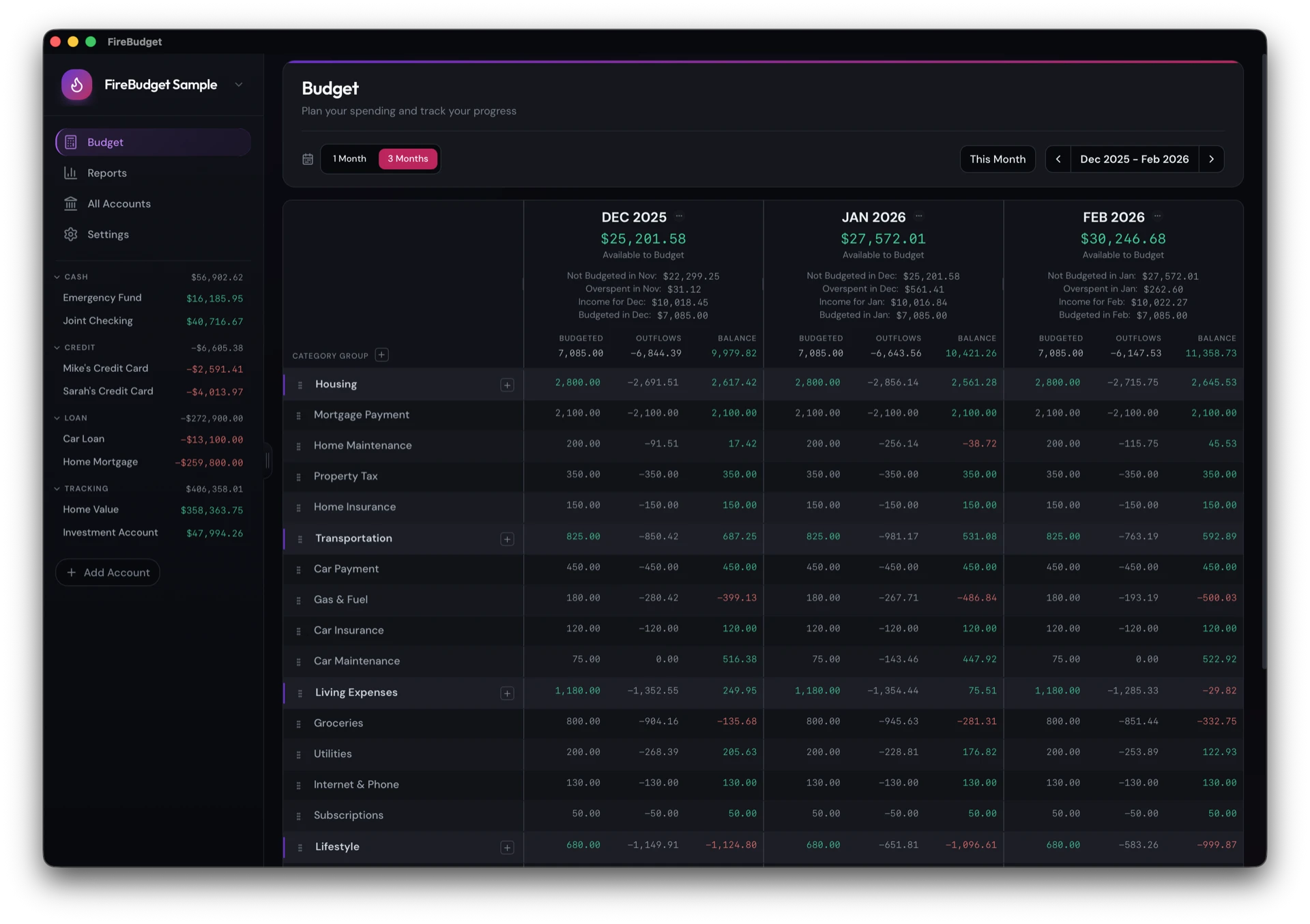
Each month’s header summarizes where you stand:
- Available to Budget: money not yet assigned to any category.
- Not Budgeted in the previous month: money left unassigned last month, which carries into this one.
- Overspent in the previous month: overspending that reduces what you have now.
- Income for the month and Budgeted in the month.
Seeing three months at once is what makes advance planning practical. You can see this month’s spending and next month’s assignments in one place, without flipping between screens.
How a change in one month affects the next
Each category follows one rule:
available this month = available last month + budgeted this month + activity this monthSo the months are linked. Some examples:
- You budget more for Groceries in October. October’s available balance goes up, and so does November’s starting point. If you had already budgeted November, November’s available balance rises too.
- You find a missed September purchase and enter it. September’s Groceries activity changes, which lowers September’s available balance and every month after it.
- You move a transaction from September to October. September’s activity goes back up and October’s goes down. Both paths are recalculated.
FireBudget recalculates every affected month for you, from the earliest change forward. You never need to adjust later months by hand to keep them consistent.
Filling in future months quickly
Typing every category for every month is slow. FireBudget has bulk actions for the whole month, under the … menu on a month’s header, or for one category from its budget cell:
- Assign by budgeted: assigned last month, or the average over the last 3 or 6 months.
- Assign by spent: spent last month, or the average over the last 3 or 6 months.
- Cover Spending: budget exactly what was spent.
- Reset Budgeted Amounts: clear the month and start again.
A practical routine for planning ahead:
- Open the 3-month view with next month as the right-hand column.
- Use Assigned Last Month on next month as a starting point.
- Adjust the categories that change: an annual insurance bill, a birthday, a trip.
- Check next month’s Available to Budget. If it is negative, you have assigned money you do not have yet. Trim the plan or wait for the next paycheck.
Recurring transactions help you see what is coming
Bills you have set up as recurring transactions appear in each account’s Recurring list with their next date, so you can budget for them before they land. See recurring transactions without bank sync.
A note on the past
Because months are linked, editing a month long ago can change today’s balances. That is correct behavior, not a bug: if a purchase really happened in March, every month since then should reflect it. If you reconcile your accounts each month, old months rarely need editing.
What FireBudget does not do
FireBudget runs only on Macs with Apple Silicon (M1 or later). It shows up to three months at once and does not have targets or goals that fund categories automatically. It has no bank sync, no mobile app, and no sync between devices.