Zero-based budgeting apps for Mac
Updated October 15, 2026
Zero-based budgeting apps for Mac fall into two groups: apps that install on the Mac itself, and web apps you use in a browser. Both work, but they differ in price model, where your data lives, and whether there is a phone app. This roundup covers the main options as of October 2026. It includes FireBudget, which we make, so we have stuck to facts you can check.
Zero-based, or envelope, budgeting means giving every dollar of income a job (a category) until nothing is left unassigned, then spending from those categories. Not every budgeting app works this way. Many track spending against limits instead, which is a different method.
Apps that install on a Mac
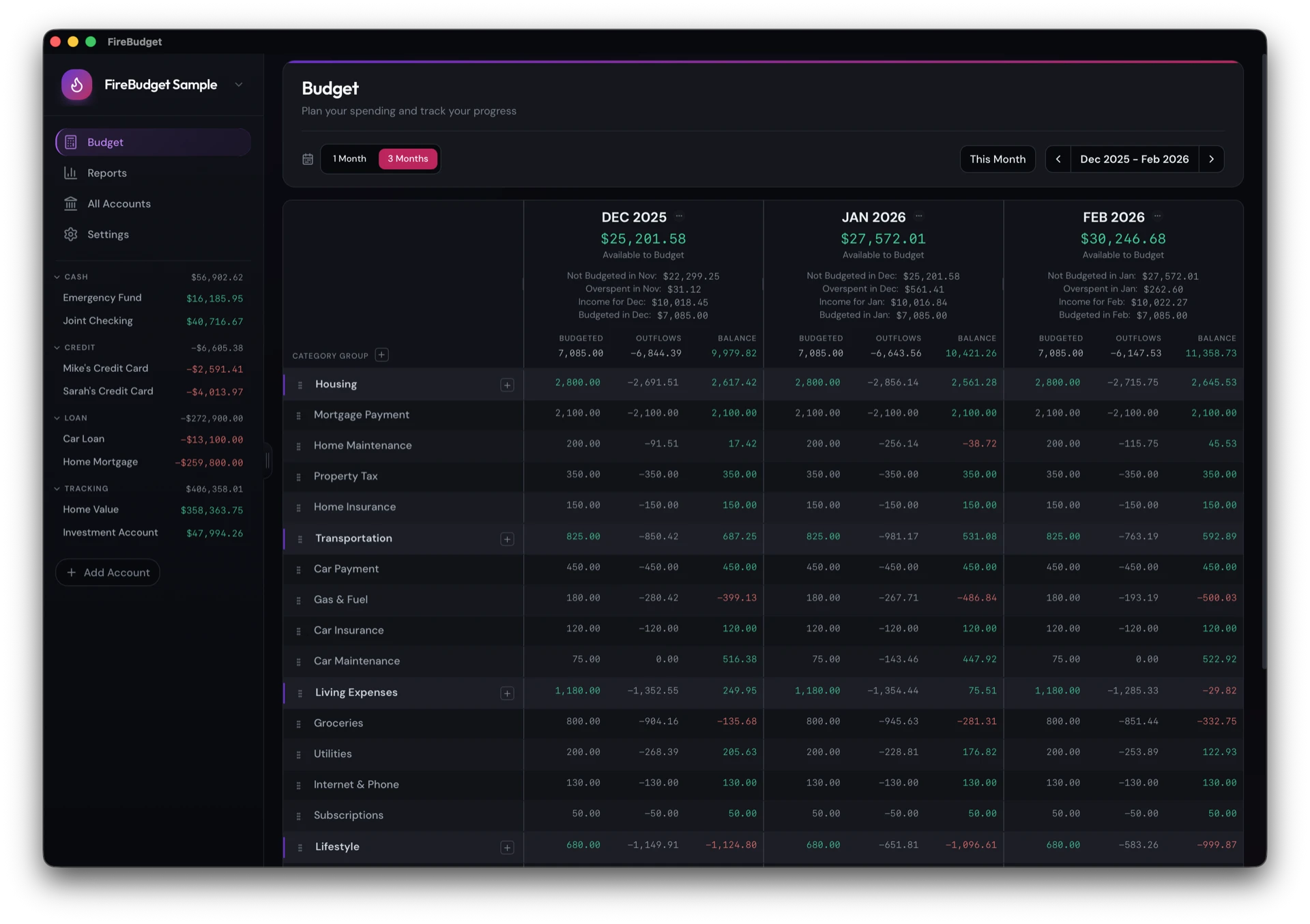
FireBudget
- Method: Zero-based, with rollover, a one- or three-month view, recurring transactions, and automatic loan interest.
- Price: $39 once, including two years of upgrades.
- Data: Local database on your Mac. No account, no cloud.
- Bank sync: No. Manual entry, bank CSV, YNAB import, or AI agents (Claude Code, Codex) importing PDF statements.
- Mobile: No.
- Requires: A Mac with Apple Silicon (M1 or later).
- Suits: Mac users who want YNAB’s method, local data, and no subscription.
Actual Budget
- Method: Envelope budgeting, very close to YNAB’s.
- Price: Free and open source.
- Data: Local in the desktop app. Optional sync server you host or rent for multi-device use.
- Bank sync: Optional, through third-party providers, via the sync server.
- Mobile: Through the web app, which needs a sync server.
- Requires: Mac, Windows, or Linux.
- Suits: Anyone who wants free and open source, especially if they are comfortable with a little self-hosting.
Buckets
- Method: Envelope budgeting.
- Price: $64 once, with an untimed trial.
- Data: A local file, shareable between devices through a shared folder or a relay.
- Bank sync: Optional, through SimpleFIN.
- Mobile: Android, and an iOS beta through TestFlight.
- Requires: Mac (Apple Silicon or Intel), Windows, or Linux.
- Suits: People who want a one-time purchase across platforms. It is a long-running solo project, still pre-1.0, with infrequent releases.
Banktivity
- Method: A full personal finance app with envelope budgeting built in.
- Price: Subscription, from about $6.99 a month billed annually.
- Data: Stored on your device, with optional encrypted cloud sync.
- Bank sync: Yes.
- Mobile: iPhone and iPad.
- Suits: Apple users who want envelope budgeting plus investments, reports, and bank sync in one native app.
MoneyWiz
- Method: General money manager. Envelope-style budgeting is possible with rollover budgets, but it takes some setup.
- Price: Subscription.
- Data: On your device, with MoneyWiz’s own cloud sync.
- Suits: People who want a general finance app on Mac and iPhone and do not need a strict zero-based model.
Web apps that work on a Mac
These have no Mac app, but run in Safari or Chrome. Safari’s Add to Dock gives them their own window.
- YNAB: The best-known zero-based app. $109 a year or $14.99 a month. Web, iPhone, and Android, with bank sync and sharing for up to six people.
- EveryDollar: Zero-based, from Ramsey Solutions. Free tier, with Premium at $79.99 a year that adds bank sync. US-focused.
- Goodbudget: Envelope budgeting with a free tier and a paid Premium plan. Web, iPhone, and Android, synced through Goodbudget’s cloud. Designed for sharing a budget in a household.
Quick comparison
| App | Installs on the Mac | Price model | Budget data | Bank sync | Phone |
|---|---|---|---|---|---|
| FireBudget | Yes | One-time | Your Mac | No | No |
| Actual Budget | Yes | Free | Your Mac or your server | Optional | Via web, needs server |
| Buckets | Yes | One-time | Local file | Optional | Android, iOS beta |
| Banktivity | Yes | Subscription | Device, optional cloud | Yes | Yes |
| MoneyWiz | Yes | Subscription | Device and cloud | Yes, on Premium | Yes |
| YNAB | No, web | Subscription | Cloud | Yes | Yes |
| EveryDollar | No, web | Free or subscription | Cloud | On Premium | Yes |
| Goodbudget | No, web | Free or subscription | Cloud | On Premium | Yes |
Prices and features are from each app’s own website in October 2026 and can change.
How to choose
- You want the method above everything else: YNAB, EveryDollar, Actual Budget, and FireBudget are all built around it.
- Your phone is where you budget: YNAB, Goodbudget, or Banktivity.
- You want no subscription: Actual Budget (free), FireBudget, or Buckets.
- You want your data to stay on your Mac with no server at all: FireBudget, Actual’s desktop app without sync, or Buckets without sharing.
What FireBudget does not do
FireBudget runs only on Macs with Apple Silicon (M1 or later). It has no bank sync, no iPhone or Android app, and no sync between devices. It does not have goals, split transactions, or Age of Money. If you need those, one of the other apps on this list is a better fit.