FireBudget vs YNAB
Updated October 15, 2026
FireBudget vs YNAB comes down to one trade. Both use the same zero-based method, where every dollar gets a job and unspent money rolls over. YNAB is a subscription service that runs everywhere and connects to your bank. FireBudget is a Mac app you buy once that keeps your budget on your computer and does not connect to your bank. This page compares them feature by feature, including where YNAB is clearly ahead. We make FireBudget, so we have tried to be specific rather than persuasive.
The short answer
- Choose FireBudget if you budget on a Mac, are comfortable entering or importing transactions yourself, and would rather pay once and keep your data local.
- Stay on YNAB if you rely on bank sync, enter spending on your phone, share a budget with a partner on different devices, or use goals and split transactions. Those are real reasons, and FireBudget does not replace them.
What works the same
If you know YNAB, the core of FireBudget will feel familiar.
- Zero-based budgeting. Income lands in Available to Budget (YNAB calls it Ready to Assign), and you assign it to categories until nothing is left.
- Category groups and categories, with a budgeted amount, activity, and available balance per category per month.
- Rollover. Unspent money stays in its category next month. Overspending shows as a negative balance you can cover, and any overspending left at month end reduces next month’s Available to Budget.
- Accounts and transfers. Checking, savings, credit cards, loans, and tracking accounts for things like investments, with transfers between them.
- Cleared and reconciled transactions, with a reconcile step that locks the rows you have checked against a statement.
- One currency per budget. Both apps let you keep several budgets, each in its own currency.
Side-by-side comparison
Facts about YNAB are from its website and help center as of October 2026.
| FireBudget | YNAB | |
|---|---|---|
| Price | $39 once, includes 2 years of upgrades | $109/year or $14.99/month |
| Free trial | No | 34 days |
| Platforms | Mac with Apple Silicon (M1 or later) | Web, iPhone, Android |
| Mac app | Yes, installs on your Mac | No, web app in the browser |
| Mobile app | No | Yes |
| Where your budget lives | A local database on your Mac | YNAB’s cloud |
| Account required | No, only your purchase email to activate | Yes |
| Bank sync | No | Yes, through Plaid and MX in supported countries |
| Sync between devices | No | Yes |
| Sharing | One Mac | Up to 6 people with YNAB Together |
| Getting transactions in | Manual entry, bank CSV, YNAB import, AI agents reading PDF statements | Bank sync, manual entry, file import |
| Scheduled transactions | Yes | Yes |
| Goals and targets | No | Yes |
| Split transactions | No | Yes |
| Age of Money | No | Yes |
| Credit card payment category | No, card payments are transfers | Yes |
| Loan interest | Automatic monthly estimate, matched to statements | Loan Planner; card interest tracking |
| Reports | Cash flow, net worth, account history | Spending, income vs expense, net worth |
| AI agents | Built-in local MCP server for Claude Code and Codex | Official API; MCP servers are community-built |
What is different
You pay once
FireBudget costs $39 and includes two years of free upgrades. After that the app keeps working, and later upgrades may be paid. YNAB costs $109 a year at today’s price, which is $545 over five years. For many people YNAB is worth it. The point is that you can choose. See YNAB alternatives with a one-time purchase for other options.
Your budget stays on your Mac
FireBudget stores your budget in a local database. There is no FireBudget account and no server holding a copy of your transactions. Over the internet it only verifies your purchase when you activate, re-checks it at most once a day, and checks for updates. You can make a full backup at any time and export your data to CSV.
No bank sync, on purpose
FireBudget never asks for bank credentials. Transactions come in through manual entry, your bank’s CSV export, recurring transactions for predictable bills, or an AI agent that reads your PDF statements. This is more work than a bank feed. Some people find that typing or reviewing each transaction is what keeps them engaged with the budget. Others will find it tedious, and for them YNAB’s bank sync is a strong reason to stay.
Credit cards work without a payment category
YNAB moves money into a Credit Card Payments category when you spend on a card. FireBudget does not have that category. Spending on a card comes out of the spending category, exactly like spending from checking, and paying the card is a transfer that does not touch the budget. The result is the same: card spending is budgeted when it happens. The credit card guide explains how to read it.
Plan several months at once
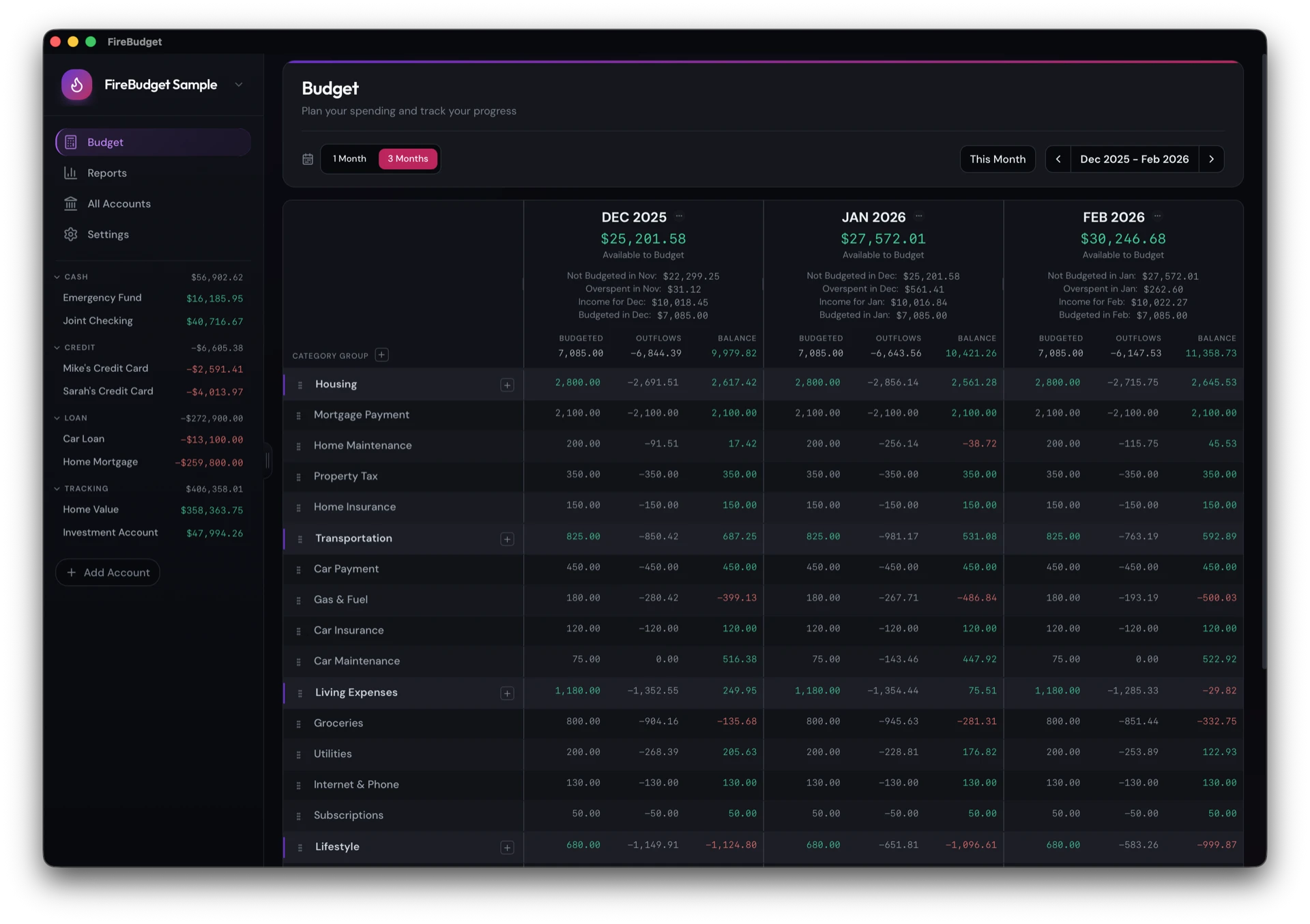
FireBudget’s budget screen can show three months side by side, so you can assign money for next month while you still see this one. Changes cascade forward automatically.
Loans keep their real balance
FireBudget can add estimated interest to a mortgage or car loan each month, so the balance and your net worth stay realistic without bank sync. How automatic loan interest works.
What FireBudget does not have
These are YNAB features with no FireBudget equivalent today:
- Bank sync and automatic transaction import
- An iPhone or Android app
- Sync across devices and sharing with a partner
- Goals and targets
- Split transactions
- Age of Money
- Flags
If two or more of those are part of your weekly routine, YNAB is probably the better tool for you. For other options, see zero-based budgeting apps for Mac.
Who should stay on YNAB
Stay on YNAB if:
- you log spending on your phone at the checkout,
- you depend on bank sync to catch everything,
- you and a partner both update the budget from different devices,
- you use targets to fund categories automatically, or
- you are on Windows or an Intel Mac.
Switching from YNAB
FireBudget can create a new budget from your YNAB export. It brings across your accounts, category groups and categories, transactions, transfers, and your monthly assigned amounts. The YNAB export and import guide walks through it step by step, and what changes when you switch covers the habits that carry over and the ones that do not.
What FireBudget does not do
FireBudget runs only on Macs with Apple Silicon (M1 or later). It does not connect to your bank, has no iPhone or Android app, and does not sync between devices. There is no free trial. If you need any of these, YNAB is a legitimate and well-made choice.