A Budget App That Feels Like Yours
Zero-based budgeting for your Mac. Give every dollar a job, plan months ahead, and keep your data on your machine — $39, once.
How it Works
Everything You Need to Budget With Confidence
Plan 3 Months at a Glance
See your budget across multiple months in one view. Plan for irregular expenses, spot overspending early, and keep the full picture visible instead of resetting your mental model every month.
- Multi-month view shows the full picture
- Overspending rolls forward transparently
- Real-time calculations across all months
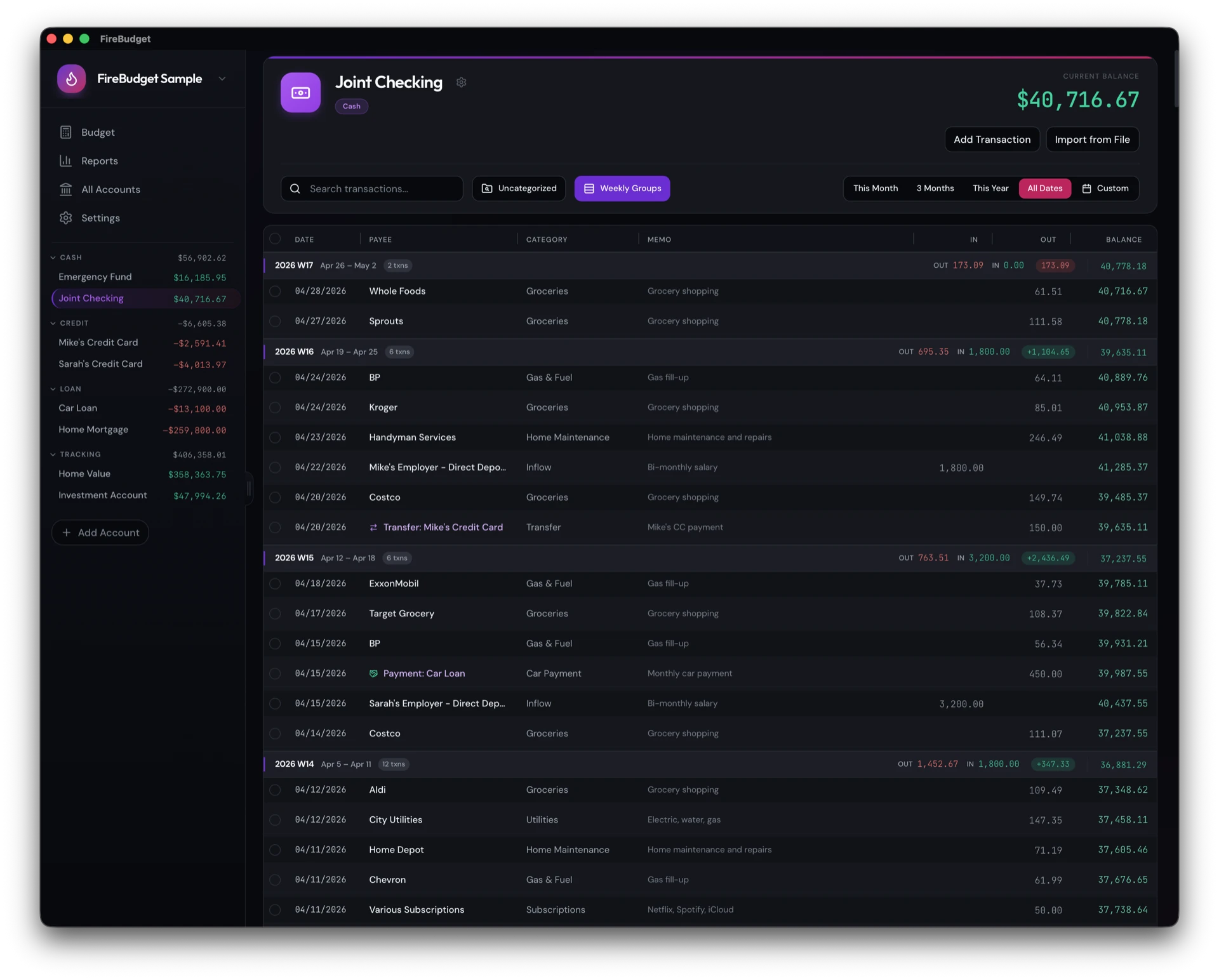
Add Transactions at Keyboard Speed
Press ⌘N on any account and a new transaction is ready to fill in. Tab through the date, payee, and category without reaching for the mouse. Pick a payee you've used before and its last category fills in for you. "Save and add another" (⌘Enter) keeps the date and account, so working through a stack of receipts goes quickly.
- ⌘N to add, ⌘Enter to save and add another
- Known payees fill in their last category
- Select many rows to categorize, move, or turn into transfers
- Clear against your statement, then reconcile to lock (⌘L)
You: Import ~/Downloads/visa-sep-2026.pdf into Visa. Card payments came from Checking. Show me a preview first.
firebudget · list_accounts, list_categories, list_payees
firebudget · import_transactions (dry run)
Agent: Preview for Visa, 43 rows. Nothing has been written yet:
- 40 new transactions, categorized from your payee history
- 2 already in FireBudget, will be skipped
- 1 card payment, linked to the Checking transfer on Sep 3
- ⚠ Possible duplicate: Trader Joe’s −$18.40 on Sep 12. Keep both or skip?
You: Skip it, then reconcile. The statement says I owe $624.37.
firebudget · import_transactions · reconcile (preview, then commit)
Agent: Imported 39 transactions, marked cleared. Cleared balance matches −$624.37, so Visa is reconciled through Sep 30.
Hand Your Statements to an AI Agent
Turn on agent access and Claude Code or Codex can read a PDF bank or card statement, match each row to your accounts and categories, and import it. You see a preview of every row before anything is written. Then the agent can clear the transactions and reconcile the account against the closing balance.
- Preview before anything changes
- Re-imports create nothing; possible duplicates are flagged for you to decide
- Card payments link to the matching checking transfer
- Off by default, local-only, and protected by a token
FireBudget sends nothing to an AI service itself. Your agent's AI provider sees the statements and rows you share with it.
Set Up Bills Once
Turn any transaction or transfer into a repeating one right from the date field. Upcoming entries wait in their own group at the top of the register, and FireBudget adds them on their due date when you open the app. No background service needed.
- Repeat regular transactions and transfers
- Preview the next dates before you save
- Upcoming entries don't touch balances until they're due
Loan Balances That Keep Up
Give a loan account its interest rate and FireBudget posts a monthly interest estimate for you, so the balance stays close to what you actually owe without manual entries. It's an estimate, not your bank's exact calculation. When a statement arrives, you can match its balance in one step.
- Monthly interest posted automatically, with the full calculation shown
- Rate history with effective dates for rate changes
- Match a statement balance to correct any drift
See Where Your Money Actually Goes
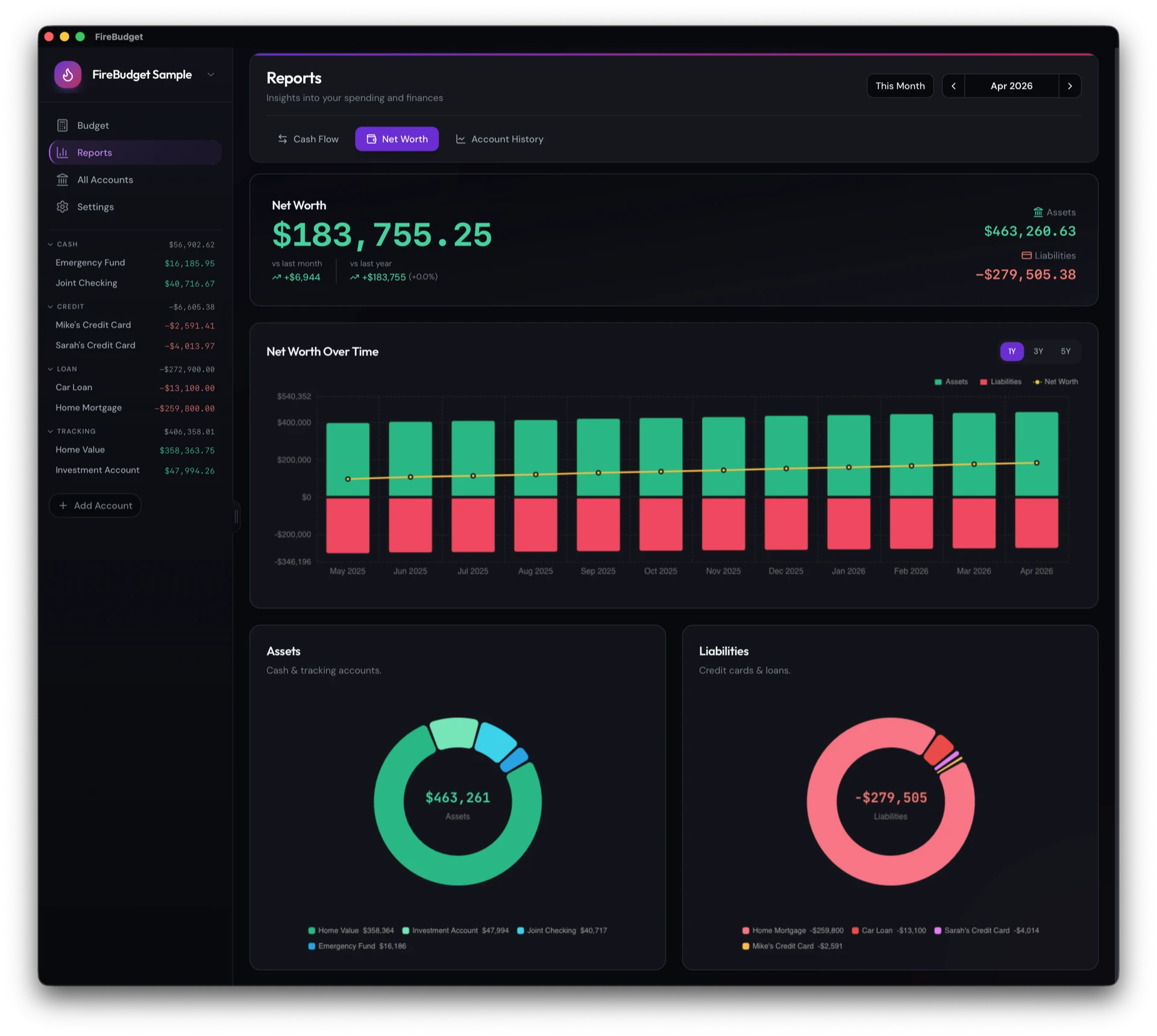
Built-in reports make the budget easier to trust. Review cash flow, spot category patterns, and follow your net worth across every account without shipping your day-to-day budgeting into a hosted dashboard.
- Income vs expenses trends over 12 months
- Spending heatmap by category and month
- Net worth trends across cash, credit, loan, and tracking accounts
Why FireBudget
Built for Privacy, Not Lock-In
The product promise is simple: buy once, keep sensitive budget data close, and use a desktop app built for actual budgeting work.
Your Budget Stays on Your Mac
Accounts, transactions, and budgets live in a local database on your Mac. There's no FireBudget cloud holding your finances and no bank login to hand over.
Pay Once, Keep It
$39 buys the app with 2 years of free upgrades. There's no subscription to cancel, and the app keeps working after the upgrade window ends.
Switch Without Starting Over
Import your YNAB budget into a fresh FireBudget budget, or bring in bank CSVs, so you don't rebuild your categories and history by hand.
Leave Anytime
Back up your budget to a file, restore it whenever you need to, or export your data. Imports take an automatic safety snapshot first. Nothing is locked inside FireBudget.
A Different Tradeoff
FireBudget is for people who want more privacy, a calmer workflow, and fewer moving parts than a hosted subscription product.
What You’re Actually Buying
Privacy
Your budget data stays close to you, with backup and export paths that make the product easier to trust.
Focus
The workflow is built around budgeting, transactions, and planning ahead instead of layering on account and subscription overhead.
Clarity
The offer is simple: one purchase, includes 2 years of free software upgrades, and a tool that is meant to feel calm and solid.
One Straightforward Purchase
Buy the desktop app once for $39. No recurring bill. No confusing tiers. Just the app and a clear upgrade window.
Every feature included
- Zero-based budgeting, planned ahead
- Keyboard-first entry and bulk editing
- Recurring bills, income, and transfers
- Loan balances with automatic interest
- Cash flow, spending, net worth reports
- Import from YNAB and bank CSV files
- AI agent access (Claude Code, Codex)
- Multiple budgets, each in any currency
- Reconciliation, backup, and data export
What happens after you buy?
Buy and download
Purchase through checkout and download the desktop app
Activate and import
Bring over an existing budget or start fresh
Budget privately
Use the app day to day with your budget data staying on your machine
macOS
Apple Silicon desktop app
Frequently Asked Questions
Quick answers to common questions
How does pricing work?
Where is my data stored?
Do I need internet to use the app?
Can I import from YNAB?
Does FireBudget connect to my bank?
Can I use AI with FireBudget?
Does the AI see my budget data?
How accurate is the automated loan interest?
Does FireBudget support my currency?
What happens if I want to leave later?
Which platform does FireBudget support right now?
Is there a mobile app?
Is FireBudget right for me?
Ready for a Budget App That Feels Like Yours?
Buy FireBudget once, keep your budget data on your machine, and use a calmer budgeting workflow without another recurring bill.
$39 one-time purchase · Includes 2 years of free software upgrades